
Directional Control
Control machine movement across the working axes with direct access to positioning and movement functions from the hand controller.
The Opus PRO control system is available on Olympus PRO and Olympus ATC CNC routers, providing an intuitive and user-friendly interface for both new and experienced CNC operators.
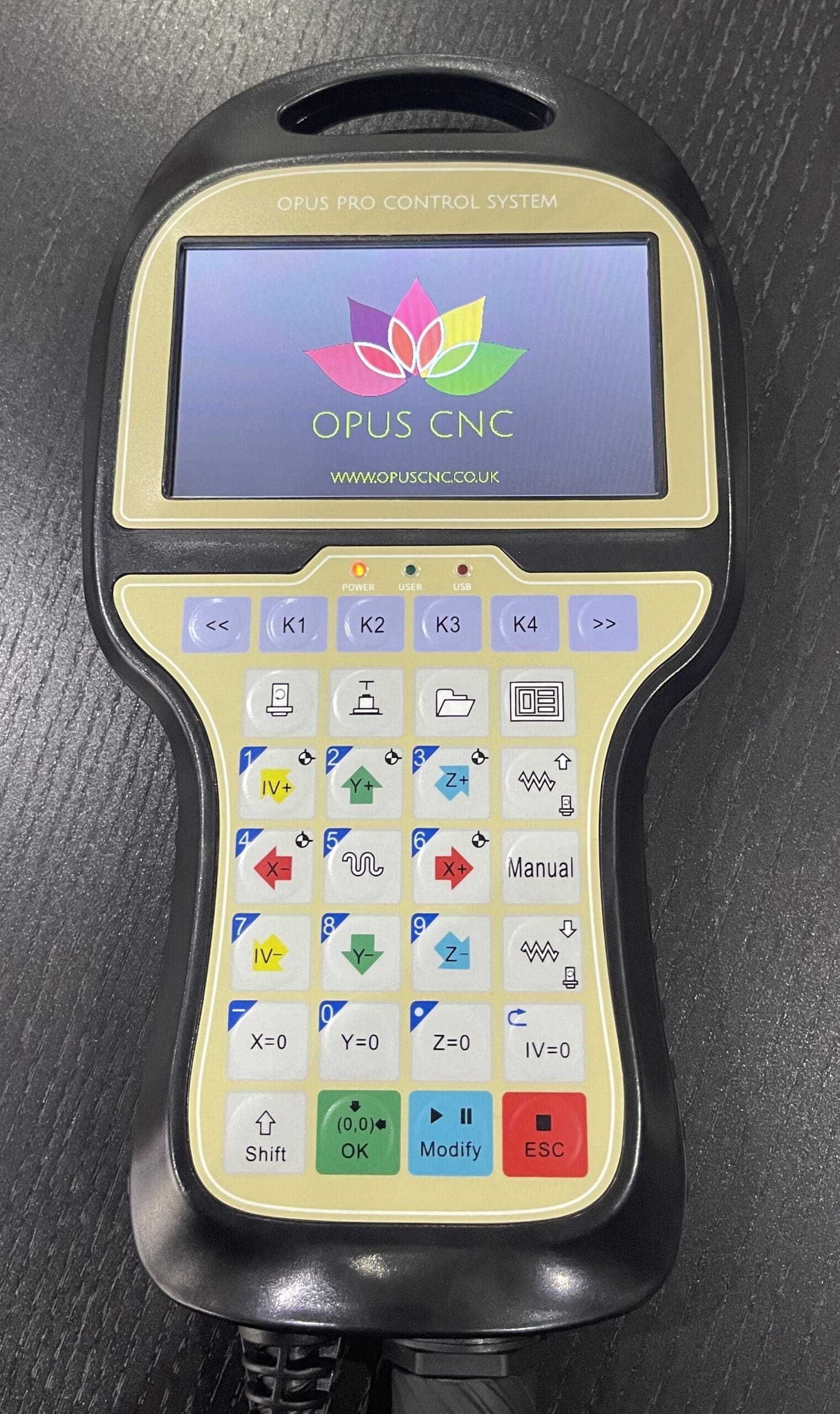
A capable CNC router needs a control system that gives the operator straightforward access to the functions they use throughout the working day.
The Opus PRO provides direct access to machine movement, spindle operation, processing functions and tool-change workflows from a dedicated hand controller.
Its clear colour interface combines everyday machine functions with more advanced processing options, providing practical control for a wide range of CNC routing applications.
Machine information and everyday controls are presented through a dedicated full-colour LCD display.
Access movement, positioning and commonly used machine functions directly from the hand controller.
Repeat processing, spindle adjustment, tool control and surface-milling functions simplify common CNC workflows.
Frequently used machining functions are brought together within one dedicated control interface.
Control machine movement across the working axes with direct access to positioning and movement functions from the hand controller.
Repeat processing functions help operators reproduce common machining operations efficiently when carrying out repetitive production work.
Adjust spindle speed in fine 1 RPM increments, allowing rotational speed to be matched closely to tooling, material and machining requirements.
Manage tool-change functions through the controller, supporting the different tool-changing workflows used across Olympus PRO and Olympus ATC machines.
Access useful processing functions including breakpoint, array, mirror and repeat operations to streamline common production tasks.
Simplify spoilboard resurfacing with a dedicated surface milling function rather than creating the complete process manually within CAM software.
The Opus PRO control system is available across the Olympus PRO and Olympus ATC CNC router ranges.
A higher-specification CNC router for businesses looking for powerful routing capability, servo performance and a straightforward manual tool-change workflow.
A production-focused CNC router with automatic tool changing for machining processes that require multiple cutters during the same job.
Day-to-day CNC operation involves much more than simply starting a cutting file. Operators need straightforward access to the controls required to prepare, position and operate the machine.
The Opus PRO brings commonly used functions together within a dedicated hand controller, helping make everyday machine operation straightforward and efficient.
Control axis movement and machine positioning directly from the dedicated controller.
Access the machine functions required to prepare and manage everyday CNC routing operations.
Fine-tune spindle speed to suit the selected cutter, material and machining requirements.
Use repeat, array, mirror and breakpoint functionality where appropriate to the machining process.
Use the controller alongside the manual tool-change workflow of the Olympus PRO or the automatic tool-changing workflow of the Olympus ATC.
Getting the best from a CNC router goes beyond the controller itself. Opus customers receive practical support around machine installation, operation, training and ongoing ownership.
Our team works with operators during machine handover and training, helping them become familiar with the controller alongside the wider CNC workflow.
Practical machine and controller training during machine handover.
Delivery, installation and commissioning from the Opus CNC team.
Ongoing technical guidance from the Opus CNC support team.
Servicing, technical assistance and practical support beyond installation.
Common questions about the control system and the CNC machines it is available on.
The Opus PRO control system is available across the Olympus PRO and Olympus ATC CNC router ranges.
The dedicated colour display and straightforward access to common machine functions provide an accessible interface for newer operators while retaining useful functionality for more experienced CNC users.
Yes. On the Olympus ATC, the Opus PRO control system is used alongside the machine's automatic tool-changing system.
Yes. Spindle speed can be adjusted in fine 1 RPM increments, allowing the operator to adjust rotational speed for the machining process.
Machine operation and software training form part of the installation and handover process, including practical guidance on using the machine controller.
Speak to the Opus CNC team about the Olympus PRO or Olympus ATC, arrange a demonstration, or discuss the right CNC router for your production requirements.